LatLonProfiles
Description
The LatLonProfiles diagnostic computes and plots zonally or meridionally averaged profiles of climate variables. The diagnostic supports both zonal means (averaged over longitude, showing latitude profiles) and meridional means (averaged over latitude, showing longitude profiles). Time series can be computed as seasonal cycles (DJF, MAM, JJA, SON) or as long-term means over the entire analysis period. Profiles can be computed over specific geographic regions, with default regions available or custom regions definable in the configuration file.
Classes
There are two main classes for computing and plotting latitude-longitude profiles:
LatLonProfiles: Computes zonally or meridionally averaged profiles of climate variables.
Supports zonal mean (average over longitude → latitude profile) and meridional mean (average over latitude → longitude profile)
Computes seasonal profiles (DJF, MAM, JJA, SON) and long-term means
Optional standard deviation calculation for uncertainty analysis
PlotLatLonProfiles: Produces publication-quality line plots of the computed profiles.
Single-panel plots for long-term means or individual seasons
4-panel plots showing all four seasons together
Supports multiple model comparison with optional reference data and ±2σ uncertainty bands
Note
The diagnostic follows a two-step process: spatial averaging (zonal/meridional) → temporal averaging (seasonal/long-term).
Getting Started
File locations:
Diagnostic code:
src/aqua_diagnostics/lat_lon_profiles/Region definitions:
config/tools/lat_lon_profiles/definitions/regions.yamlExample notebooks:
notebooks/diagnostics/lat_lon_profiles/Config template:
templates/diagnostics/config-lat_lon_profiles.yaml
Supported variables:
The diagnostic works with climate variables on regular latitude-longitude grids:
Direct variables:
2t(temperature),tprate(precipitation),psl(pressure), etc.Derived variables: Using
EvaluateFormulasyntax (e.g.,2t - 273.15for °C)
Supported regions:
global (or null), tropics, europe, nh (Northern Hemisphere),
sh (Southern Hemisphere).
Custom regions can be defined in config/tools/lat_lon_profiles/definitions/regions.yaml.
Basic usage
The recommended way to use this diagnostic is through the Python API, as shown in the notebooks below.
Minimal example:
from aqua.diagnostics.lat_lon_profiles import LatLonProfiles, PlotLatLonProfiles

# Compute zonal profile
llp = LatLonProfiles(
    catalog='climatedt-phase1',
    model='ICON',
    exp='historical-1990',
    source='lra-r100-monthly',
    startdate='1990-01-01',
    enddate='1999-12-31',
    region='tropics',
    mean_type='zonal'  # or 'meridional'
)
llp.run(var='tprate', units='mm/day', std=True)

# Plot long-term mean
plot = PlotLatLonProfiles(data=[llp.longterm], data_type='longterm')
plot.run(outputdir='./')
For seasonal or multi-model comparisons, see the detailed examples in the section below.
Available demo notebooks
📓 Single-model analysis → single_line_profiles.ipynb
Learn the basics: compute profiles, compare with observations, create seasonal plots
📓 Multi-model comparison → multiple_lines_profiles.ipynb
Advanced usage: compare different models, historical vs future scenarios, batch processing
Key concepts covered:
Zonal vs meridional profiles:
mean_type='zonal'or'meridional'Seasonal indexing:
seasonal[0](DJF),seasonal[1](MAM),seasonal[2](JJA),seasonal[3](SON)Plot types:
data_type='longterm'(single panel) vs'seasonal'(4 panels)Uncertainty bands:
ref_dataandref_std_dataparametersRegional selection and custom regions
CLI usage
For batch processing or automation, the diagnostic can be run via CLI using a configuration file:
# Copy and customize the template
cp templates/diagnostics/config-lat_lon_profiles.yaml my_config.yaml

# Run diagnostic
python src/aqua_diagnostics/lat_lon_profiles/cli_lat_lon_profiles.py \
    --config my_config.yaml \
    --model ICON \
    --exp historical-1990 \
    --loglevel INFO
Key CLI arguments:
--config, --model, --exp, --catalog, --source, --regrid,
--realization, --outputdir, --startdate, --enddate, --loglevel, --nworkers
For the complete list of arguments, run:
python src/aqua_diagnostics/lat_lon_profiles/cli_lat_lon_profiles.py --help
Note
Suggested worflow: Copy the template
(cp templates/diagnostics/config-lat_lon_profiles.yaml my_config.yaml), customize it with
your parameters, and run with --config my_config.yaml.
Quick testing: CLI arguments (--model, --exp, etc.) can override config file
values without editing the file, useful for rapid experimentation.
For most use cases, we recommend the programmatic approach (notebooks) rather than CLI.
Configuration file structure
The template (templates/diagnostics/config-lat_lon_profiles.yaml) defines datasets,
reference data, and diagnostic parameters:
Basic structure:
# Dataset(s) to analyze
datasets:
  - catalog: 'climatedt-phase1'
    model: 'ICON'
    exp: 'historical-1990'
    source: 'lra-r100-monthly'
    startdate: '1990-01-01'
    enddate: '1999-12-31'

# Reference dataset (optional)
references:
  - catalog: 'obs'
    model: 'ERA5'
    exp: 'era5'
    source: 'monthly'
    std_startdate: '1990-01-01'  # Period for std calculation
    std_enddate: '1999-12-31'

# Output settings
output:
  outputdir: "./"
  save_pdf: true
  save_png: true
  dpi: 300

# Diagnostic configuration
diagnostics:
  lat_lon_profiles:
    run: true
    mean_type: 'zonal'           # or 'meridional'
    seasonal: true               # Compute seasonal profiles
    longterm: true               # Compute long-term mean
    variables:
      - name: 'tprate'
        regions: ['global', 'tropics']
Multiple datasets example (for multi-model comparison):
datasets:
  - catalog: 'climatedt-phase1'
    model: 'ICON'
    exp: 'historical-1990'
    source: 'lra-r100-monthly'
    startdate: '1990-01-01'
    enddate: '1999-12-31'

  - catalog: 'climatedt-phase1'
    model: 'IFS-NEMO'
    exp: 'historical-1990'
    source: 'lra-r100-monthly'
    startdate: '1990-01-01'
    enddate: '1999-12-31'
Derived variables (using formulas):
diagnostics:
  lat_lon_profiles:
    variables:
      - name: '2t'
        regions: ['global']

    formulae:
      - name: 'temp_celsius'
        formula: '2t - 273.15'
        units: '°C'
        long_name: 'Temperature in Celsius'
        regions: ['global', 'tropics']
For the complete template with all available options, see
templates/diagnostics/config-lat_lon_profiles.yaml.
Outputs
The diagnostic generates:
📊 Plots (PDF and/or PNG):
Long-term profiles (single panel)
Seasonal profiles (4-panel: DJF, MAM, JJA, SON)
Multi-model comparisons with uncertainty bands
📁 NetCDF files:
Processed profiles for each frequency and region
Standard deviation files (if computed)
Naming convention:
<diagnostic>_<mean_type>_profile_<freq>_<var>_<region>_<model>_<exp>.<format>
Example:
lat_lon_profiles_zonal_profile_longterm_tprate_tropics_ICON_historical-1990.png
Example plots
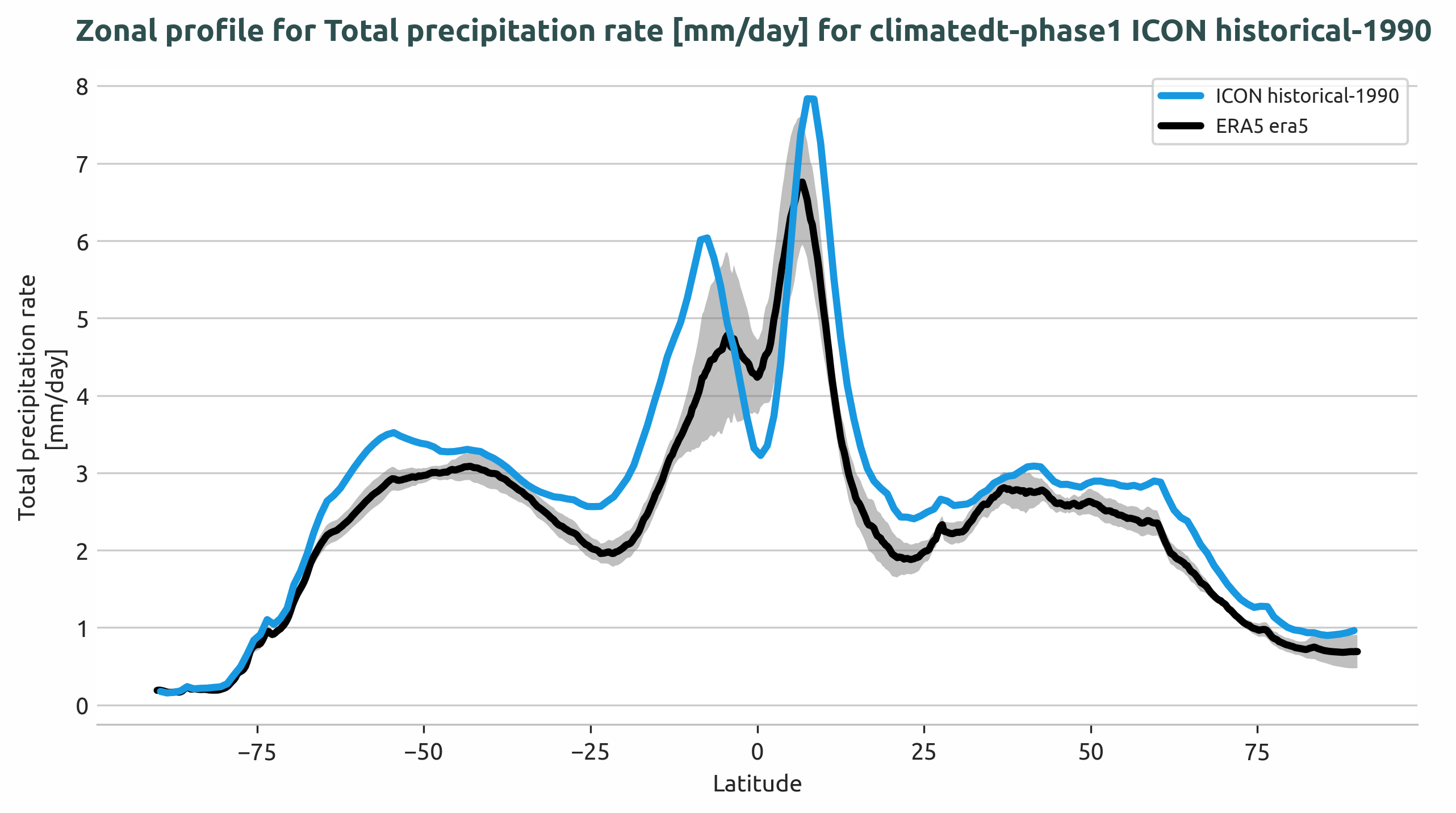
Long-term zonal mean precipitation rate profile for the Tropics region, showing ICON model output compared to ERA5 reference data with ±2σ uncertainty bands.
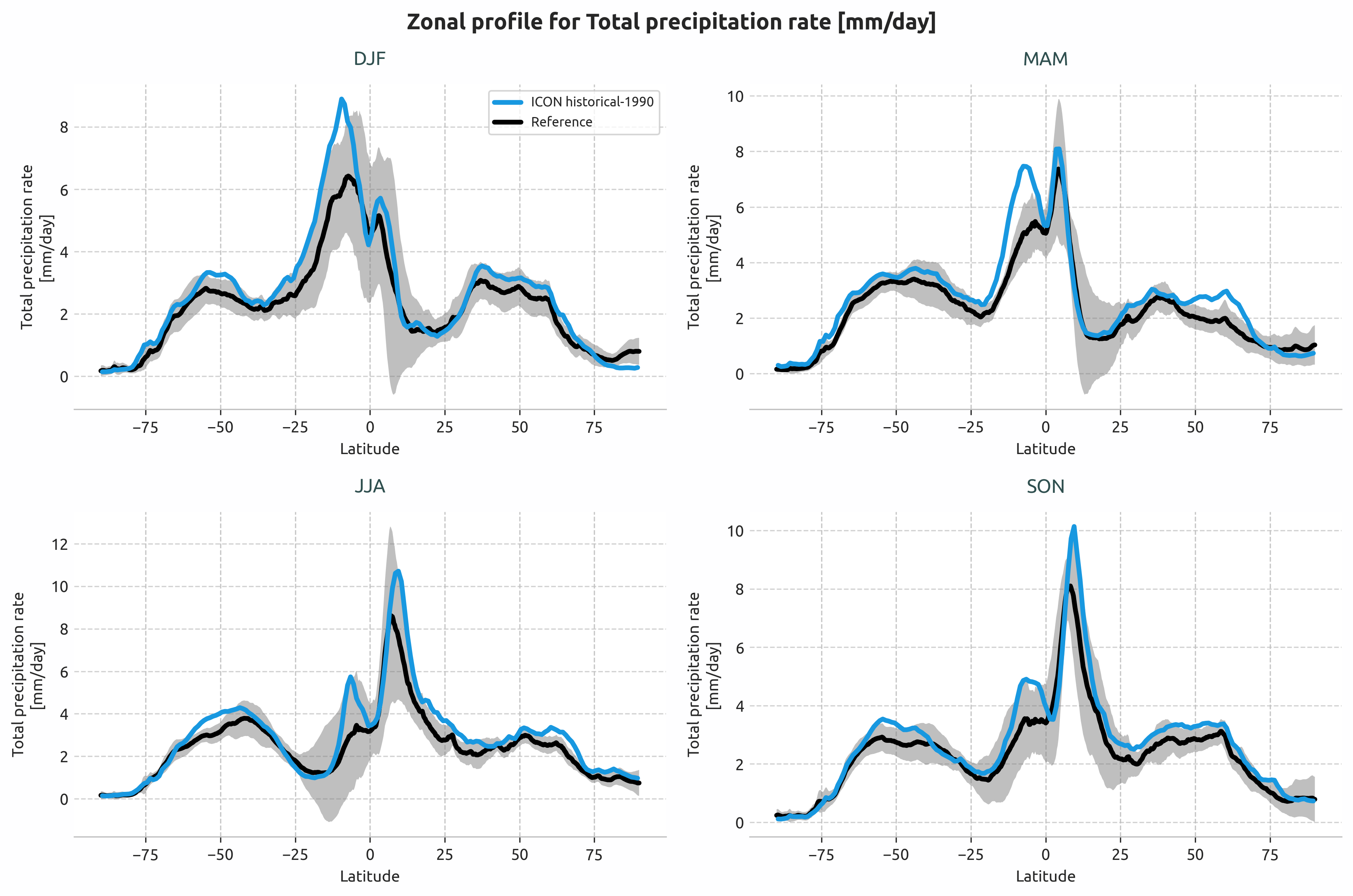
Seasonal zonal mean precipitation rate profiles (DJF, MAM, JJA, SON) for the Tropics region.
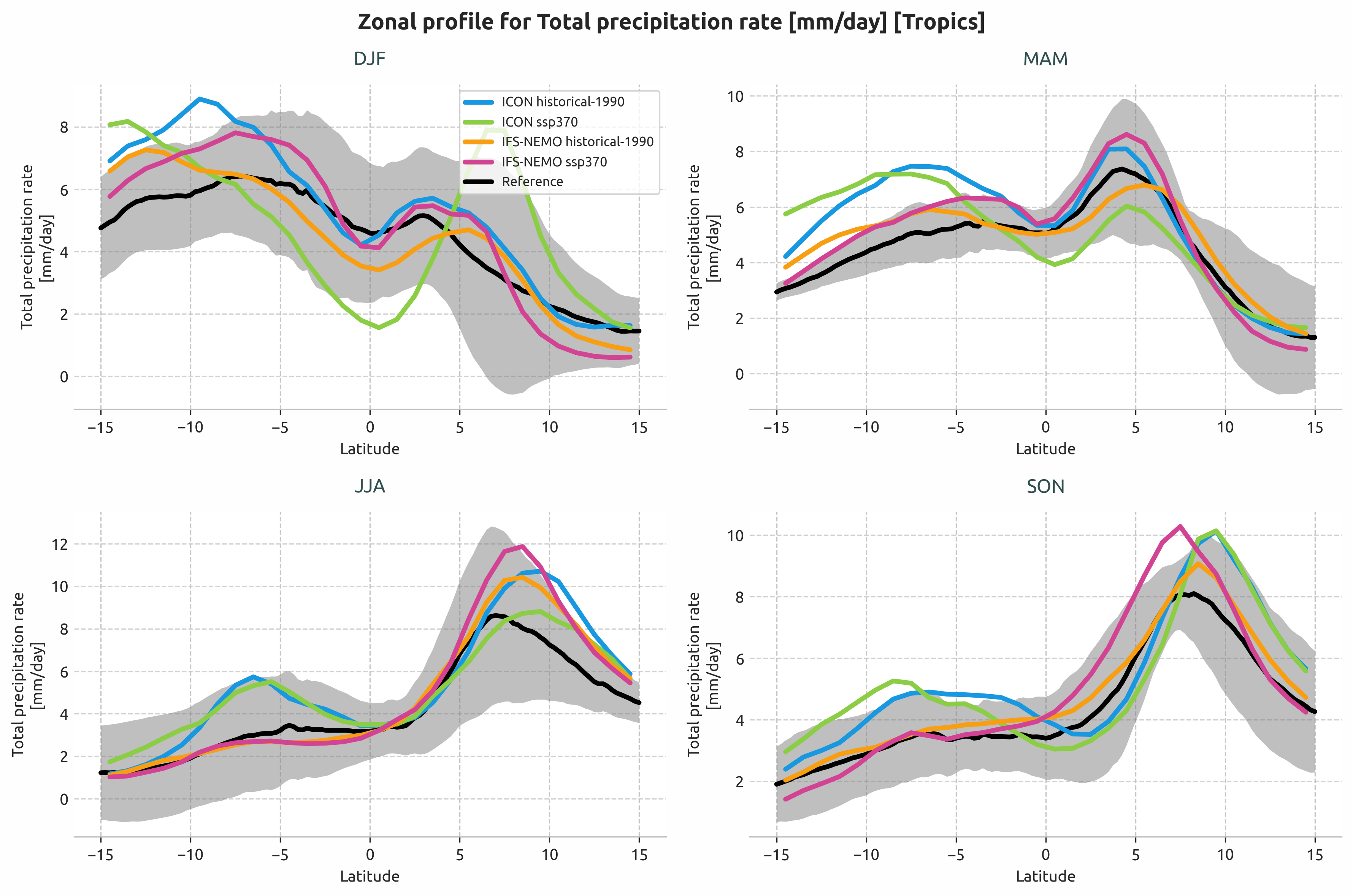
Multi-model comparison: ICON and IFS-NEMO historical and SSP3-7.0 scenarios.
Reference datasets
Common reference datasets:
ERA5: ECMWF’s fifth generation reanalysis for global climate
MSWEP: Multi-Source Weighted-Ensemble Precipitation dataset
BERKELEY-EARTH: Berkeley Earth Surface Temperature dataset
Standard deviation can be computed over a custom period using std_startdate and
std_enddate to provide ±2σ uncertainty bands in plots.
Developer Notes
Internal structure:
The diagnostic uses a two-step averaging process:
Spatial averaging via
reader.fldmean()withdimsparameter:Zonal means:
dims=['lon']→ latitude profilesMeridional means:
dims=['lat']→ longitude profiles
Temporal averaging via
reader.timmean()with frequency:Seasonal:
freq='seasonal'→ 4 DataArrays [DJF, MAM, JJA, SON]Long-term:
freq=None→ single temporally-averaged DataArray
Data attributes:
Metadata attached to DataArrays for downstream plotting:
AQUA_mean_type:'zonal'or'meridional'AQUA_region: Selected region nameStandard CF attributes:
long_name,standard_name,units
Graphics functions:
plot_lat_lon_profiles(): Single-panel line plotsHandles single or multiple DataArrays
Supports reference data with optional std shading
Auto-detects coordinate names (lat/lon, latitude/longitude)
plot_seasonal_lat_lon_profiles(): 4-panel seasonal plotsRequires exactly 4 elements [DJF, MAM, JJA, SON]
Each panel supports multiple model lines
Reference data and std shading per season
Data flow:
LatLonProfiles.retrieve()→ Get data from catalogLatLonProfiles.compute_dim_mean()→ Spatial + temporal averagingLatLonProfiles.compute_std()→ Optional std computationLatLonProfiles.save_netcdf()→ Save processed dataPlotLatLonProfiles.__init__()→ Load data and metadataPlotLatLonProfiles.run()→ Create and save plots
PlotLatLonProfiles data_type parameter:
data_type='longterm': Single DataArray or list → single-panel plotdata_type='seasonal': List of 4 elements → 4-panel plot
For seasonal plots with multiple models:
data = [
    [model1_DJF, model2_DJF, ...],  # DJF panel
    [model1_MAM, model2_MAM, ...],  # MAM panel
    [model1_JJA, model2_JJA, ...],  # JJA panel
    [model1_SON, model2_SON, ...]   # SON panel
]